Inventory Software for Small Manufacturers
Track parts, build products, and know what things cost. Simple inventory management for shops that build things.
Running a small shop means juggling parts, projects, and prices all at once. You need to know what materials you have on the shelf, what is sitting on the workbench, and how much each finished product actually costs to build. Inventory Pro keeps track of all that for you - no complicated setup, no servers, no IT department. Just a simple way to manage what you build and what it takes to build it.
What You Build and What It Takes
Every product you build starts with a list of parts. Inventory Pro lets you write down exactly what goes into each product, then tracks those parts as you build. When you start a job, the system tells you what you have and what you are missing before you waste time on the bench.
Lists of Parts
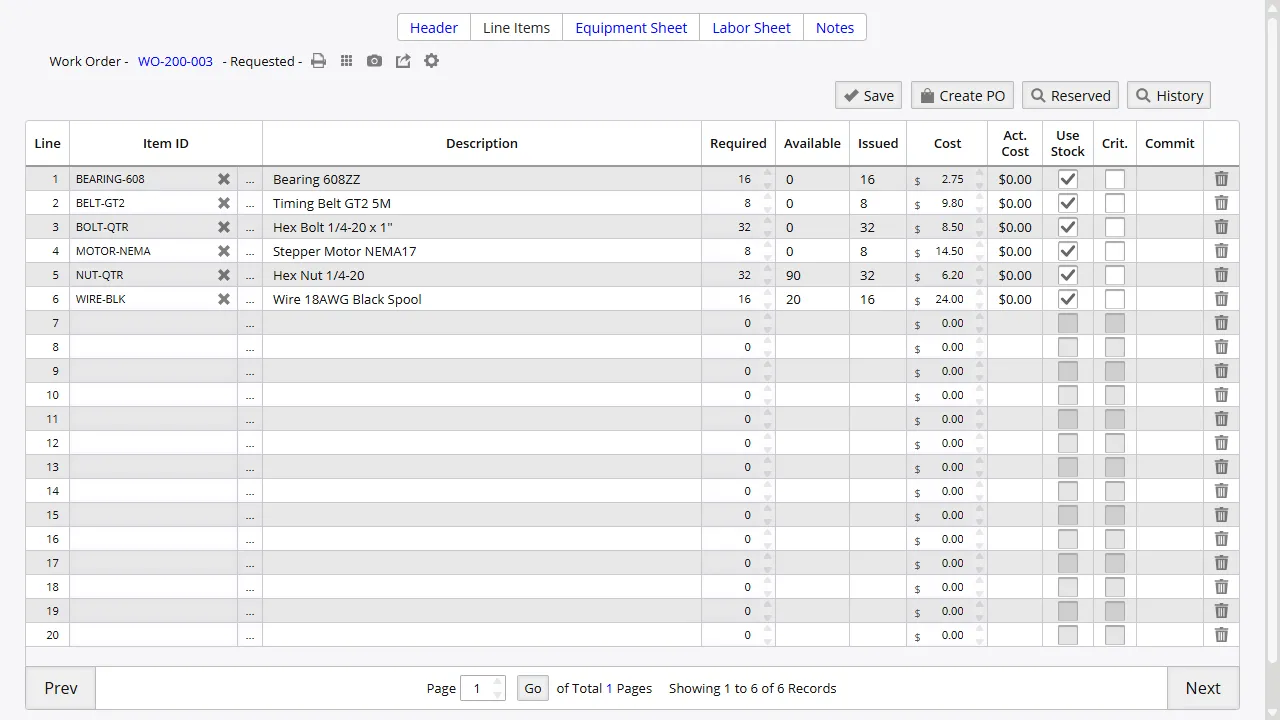
Write down what goes into each product. Products can include sub-assemblies that have their own parts lists. When you start a job, Inventory Pro checks your stock and tells you what you need to order before you begin.
Track Jobs as You Build
Create jobs to track what you are working on, how many parts you have used, and what is left to finish. See at a glance which jobs are waiting on parts and which are ready to ship. No more guessing where things stand.
Know What to Order and When
The hardest part of running a shop is knowing when you are about to run out of something you need. Inventory Pro watches your stock levels and tells you when parts are getting low, so you can order before production stops.
Low Stock Alerts
Get notified when parts hit your minimum levels. No more running to the shelf and discovering you are out of something you need for a job due tomorrow.
Smart Suggestions
Inventory Pro looks at what you have, what you have on order, and how fast you use each part. It suggests what to buy and how much, so you do not have to guess.
Quick Assembly
For simple jobs, you can assemble products quickly without formal work orders. Use your phone to scan parts, consume them from stock, and add the finished product back - all in one step.
Track Your Parts from Shelf to Ship
Sometimes you need to know where a part came from or which job it went into. Inventory Pro keeps a record of every batch and serial number, so if something goes wrong you can find it fast.
Batch and Serial Numbers
- Batch numbers assigned automatically when parts arrive
- Serial numbers tracked through assembly and shipping
- Expiration dates with first-expired-first-out picking
- Full history from receiving to shipping
- Track weight, age, and other details per batch
Quality Checks
- Record inspection results for each batch or serial number
- Track certifications and who signed off on them
- Link inspection records directly to inventory items
- Keep a complete record for audits
Know What Things Cost to Build
You cannot price your products right if you do not know what they cost. Inventory Pro adds up the parts, labor, and equipment time for each job so you can see your real cost and set prices that keep you in business.
Parts Cost
See exactly how much each part costs and how much goes into each product. Costs update automatically when your purchase prices change.
Labor Cost
Track how long each job takes and what that labor costs you. Compare time spent across similar jobs to find where you can save time and money.
Total Job Cost
Combine parts, labor, and equipment time to see the full cost of each job. Know your margins before you quote a customer.
Built for Real Shops
Scan Barcodes with Your Phone
No special scanner needed. Use your phone to scan barcodes on parts, jobs, and shipments. Works with any standard barcode.
Works on Any Computer
Inventory Pro runs in your browser. Open it on any computer or tablet in the shop. No software to install.
Multiple Locations
Track parts across your warehouse, shop floor, and shipping area. Move things between locations and see where everything is.
Track Repair Jobs
Some items come back for fixes. Track repair jobs separately from regular production so nothing gets lost.
Group Jobs Together
Group related orders, parts, and jobs under one project name. Easy to see the full picture for each customer or contract.
Reports That Make Sense
See what you have in stock, what is on order, what is being built, and what is ready to ship. Reports update in real time.
Connects with What You Already Use
Inventory Pro works with the tools you already have. It talks to popular accounting software so your inventory numbers match your books, and it ships products through UPS without double-entry.
Accounting Software
- Sage 50 - items, vendors, customers, orders with status updates
- QuickBooks Desktop - items, vendors, customers, orders
- Spectrum ERP - automated data sync
Shipping and Data
- UPS WorldShip for shipping labels and tracking
- EDI for electronic orders and invoices
- Custom connections through our API
- XML data exchange for supply chain partners
See How It Works on Your Shop Floor
Try Inventory Pro free for 30 days. No credit card, no setup, no commitment. See how it handles your parts, your jobs, and your costs before you spend a single dollar.