Your Data, Your Rules
Set up user roles so everyone sees only what they need. Every action is logged for your records.
User Roles and Permissions
Give each person access to exactly what they need. Create roles for warehouse staff, office workers, and managers. Control who can see reports, process orders, or change item records.
- Restrict by warehouse, supplier, or customer
- Control access to individual features and reports
- Outside users see only their own data
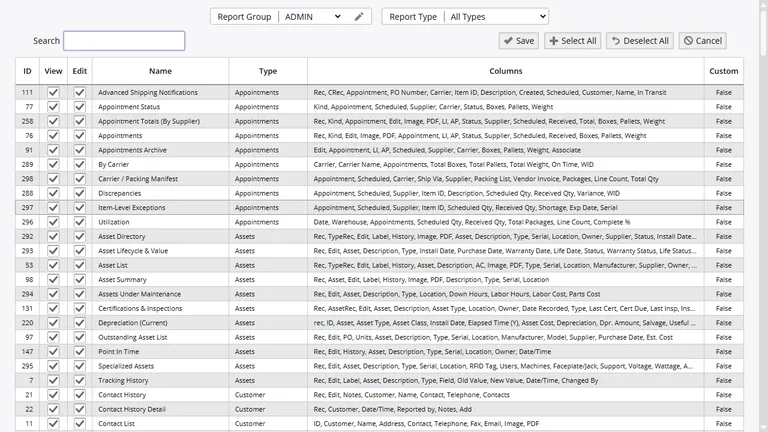
Your team, your customers, and your vendors each see only what is relevant to them. No accidental data sharing.
Use Your Existing Logins
If your company uses Active Directory or another identity system, connect it to InventoryPro so your team logs in with the same credentials they already know. One less password to remember.
SSO means your IT team manages user access in one place. When someone leaves the company, disabling their account cuts off access everywhere, including Inventory Pro.
Passwords and Sessions
Set your own password rules: minimum length, complexity, how often passwords expire, and how many tries before an account locks. When you create a new user with a temporary password, they have to change it on their first login.
Sessions time out after inactivity so nobody stays logged in on a shared computer. Too many wrong passwords? The account locks and an admin has to unlock it.
Password Rules
Length, complexity, expiration, history, and forced reset on first login.
Session Safety
Auto-timeout on idle, failed login lockout, and admin-only unlock.
Order Approvals
Require sign-off before big orders go through. Purchase orders, shipping orders, and work orders can all go through an approval chain. Nothing ships until the right people say yes. Learn more about approvals.
Everything Is Logged
Every action your team takes is recorded: who did it, when, and what changed. If an item count looks wrong or an order was modified, you can trace it back to the exact transaction.
Change tracking goes beyond transactions. Edits to item records, cost adjustments, and permission changes all get logged with before-and-after values. Useful for year-end reviews, insurance claims, or just answering "who changed this?"
Customer and Vendor Logins
Let your customers check their own order status. Give vendors visibility into their items and purchase orders. Each outside user sees only their own data - nothing else.
You can set accounts to read-only so outside users can look but not change anything. Reports follow the same rules - vendors and customers only see data that relates to them.
Security That Grows With You
Start simple with basic roles. Add more controls as your team and compliance needs grow.