Bring Your Spreadsheet Data (and Leave It There)
Your stock list already lives in Excel. Pull it into InventoryPro once, keep it current with the same file, and export anything back — without retyping a single row.
Import From the Spreadsheet You Already Have
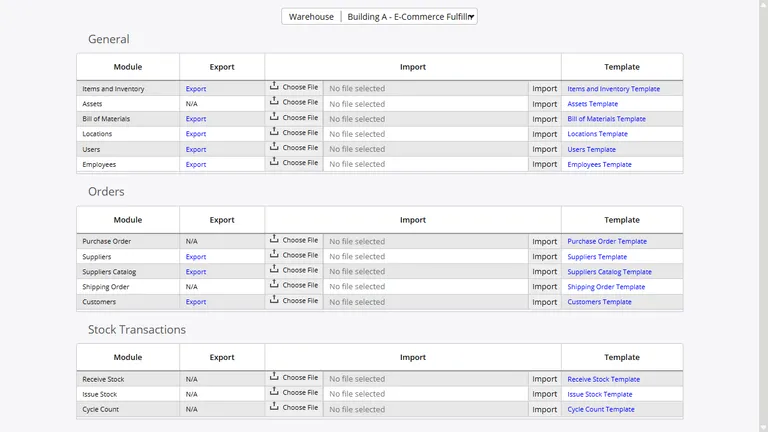
Bring in items, suppliers, customers, purchase orders, and current stock from CSV or Excel. A field-mapping wizard lines up your column headers with InventoryPro fields and handles alignment automatically. When your source file uses odd column names, override any mapping by hand.
- CSV and Excel (.xls, .xlsx) supported
- Auto-mapping with manual override
- A validation report before anything is committed
One-Click Export Back to Excel
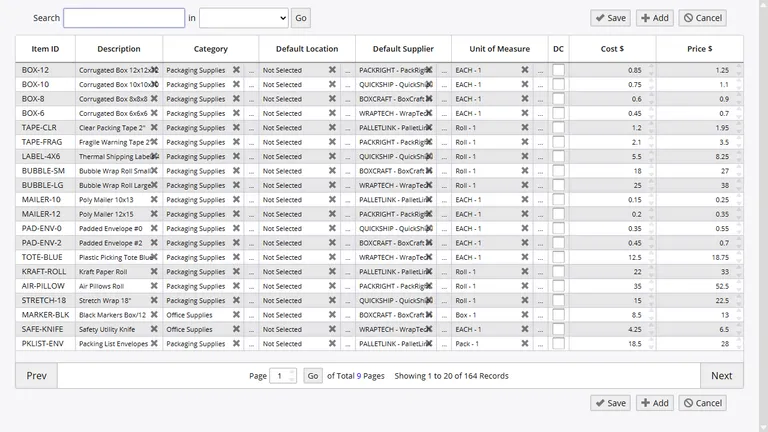
Every grid and report in InventoryPro exports to CSV or Excel with one click. Filter the data, sort it the way you need it, then export exactly what is on screen — same columns, same order, same filters.
That works across all 260+ standard reports, custom reports, and every data grid in the system. Your staff can pull their own numbers without waiting on anyone to run a query.
Need programmatic access instead of manual exports? The REST API exposes the same data for automated reporting and integration with external systems.
Update a Whole Category in One Pass
Raised prices across a category, moved stock to a new location, or changed min/max levels? Export, edit in Excel, re-import. Thousands of items update through the same validated process, with a rollback check if errors are detected.
- Batch price updates across item categories
- Mass category and location reassignment
- Progress tracking for large batch jobs
Supplier Price Lists, Imported as Sent
When a supplier sends a new price list, import the file and the system matches rows to your existing items by SKU or supplier part number. New items get flagged for review before they reach your master item list.
Import the next revision and InventoryPro highlights exactly what changed: price increases, discontinued products, new items. No side-by-side spreadsheet comparison at the end of the month.
How We Compare
vs. Manual Data Entry
Typing items in one at a time eats the good part of a day and invites typos. A big import finishes in minutes — with validation, instead of a pile of late-discovered data-entry errors.
vs. API-Only Import Systems
Some platforms need custom API work for any bulk load. InventoryPro gives you the spreadsheet workflow you already know, with API access available when automation makes sense.
Stop Typing the Same Data Twice
Tell us where your data lives today — a spreadsheet, an accounting package, a box of paperwork. We'll show you how it moves into InventoryPro without transcription.